
What it takes to run several AI coding agents in parallel on an older Rails project, without touching application code.
In short: Older Rails projects were set up for one developer working on one thing at a time, so several AI coding agents working at once get in each other's way. We fixed this on an app we've been building since 2015 with six changes: git worktrees, settings read from the environment, separate ports per worktree, a separate Postgres and Redis per worktree, one script that sets it all up in about 20 seconds, and a skill that teaches the agents to use it. None of the changes touched application code.
AI coding agents can take on several tasks at the same time, and that is where most of the speed comes from. But an older project usually can't use that speed, because it was set up for one person. Before agents, the default was one local checkout of the repository, one local database, and one running instance of the app. That made sense, because most of the time there was one person with one pair of hands on one keyboard, one pair of eyes, and, more importantly, one brain making the changes.
That limit is gone. DHH put it bluntly in his Rails World 2026 keynote: "It's pencils down, people. Writing code by hand is no longer an economically viable skill for most programmers at most companies." Now there are several agents working on the same project at once, and when they all share one checkout, they step on each other's toes all the time:
Two agents edit files in the same directory, and one of them commits the other's half-finished work.
One agent runs the tests, which resets the test database while another agent is in the middle of its own test run.
The second
bin/devfails because port 3000 is already taken.A migration from one branch lands in the database that another branch is using.
None of these fail with an error that tells you what happened. You just get strange results and lose an afternoon.
In this post I'll go through the six changes we made so that several AI coding agents can work in parallel on a Rails app we've been building since 2015. The details are specific to Rails and web applications, but the same six steps apply to any application with a database.
1. Git worktrees: one checkout per agent
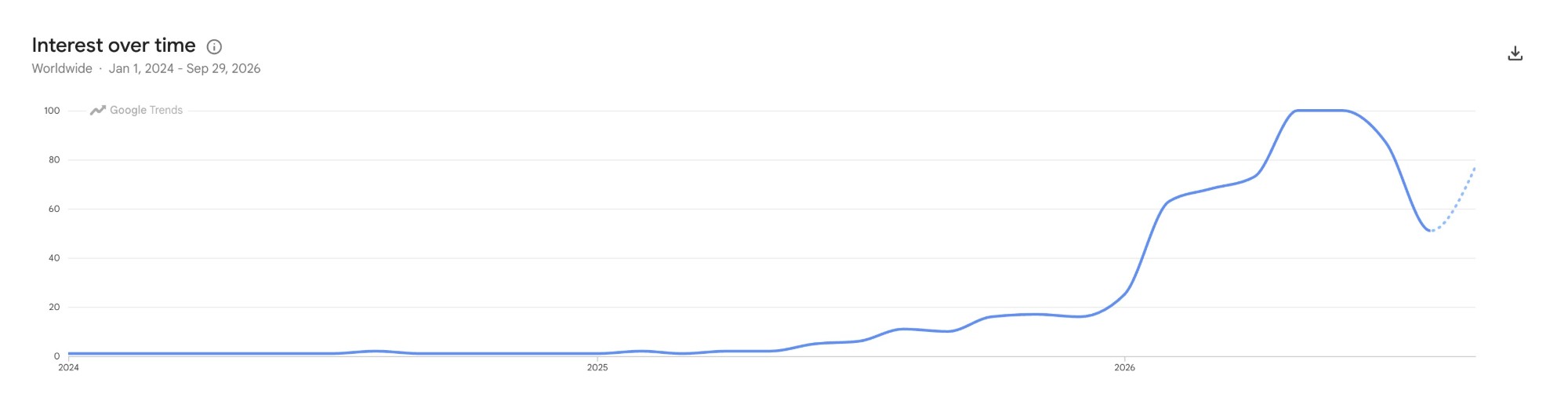
The single checkout is the reason an old git feature has become so relevant: worktrees. Git has had them since 2015, but almost nobody searched for them until late 2025, and then interest shot up at the start of 2026:
A worktree is a second working directory attached to the same repository, with its own branch checked out. Each feature or task gets its own directory with its own copy of the code, so agents and humans stop overlapping each other.
This is the command to create one:
git worktree add <path-to-new-folder> <existing-branch-name>
You no longer need to stash your changes to switch branches because something you were doing left untracked files behind. More importantly, two or more agents can make changes in parallel, in isolation. What one agent changes has no effect on what another agent is doing or validating.
Anyway, this is the easy part. Worktree support is already built into most of the popular agent harnesses. Most agents already know how to use worktrees, and some harnesses even ship a skill for it. So for this step, the work on your side is to give the agent your project's conventions. For example, you can tell it in your CLAUDE.md or AGENTS.md where you want your worktrees to live:
When using worktrees, create them in `.worktrees/` at the root of the main checkout.
And when prompting, ask the agent to use a worktree for that work:
<your prompt>


Use a worktree to implement/validate/test/check this.
With the checkout problem solved, the next question is: how can each agent run, test, and execute its code without messing with the other agents' databases?
2. Read Rails settings from the environment
This step enables all the others. Each worktree needs its own environment so it can tell itself apart from the other worktrees at runtime and stay isolated. If I have more than one instance of the app running on one machine, each instance needs to know which port to use. The same goes for the database: each worktree needs to know which port its database is on.
That means all of these settings have to come from the environment instead of being set in the code. In our case, the fifth commit in the repository, from July 2015, is "Removed database.yml". From then on, every developer kept their own gitignored config/database.yml, created from a database.yml.sample, and CI copied in a third file of its own. Eleven years later, we put it back. We replaced all three with one tracked file that reads from the environment and falls back to the old defaults:
local: &local

  <<: *default

  username: <%= ENV.fetch('POSTGRES_USER', 'postgres') %>

  password: <%= ENV.fetch('POSTGRES_PASSWORD', 'postgres') %>

  host: <%= ENV.fetch('POSTGRES_HOST', 'localhost') %>

  port: <%= ENV.fetch('POSTGRES_PORT', 5432) %>


development:

  <<: *local

  database: <%= ENV.fetch('POSTGRES_DB', 'myapp_development') %>


test:

  <<: *local

  database: <%= ENV.fetch('POSTGRES_DB_TEST', 'myapp_test') %><%= ENV['TEST_ENV_NUMBER'] %>
Deployed environments still get everything from DATABASE_URL, so staging and production didn't change. CI now sets two environment variables instead of copying a file. And a developer with no environment variables set gets the same behavior as before.
Once the configuration comes from the environment, a worktree can point at a different Postgres without changing a single file. Each worktree only needs its own environment to load the settings from.
3. Separate ports for every worktree
The code already reads its settings from the environment, so now we need a way to give each worktree different values. We did it by giving each worktree an index and deriving every port from it: Rails gets 3000 + 10 × index, Postgres gets 5432 + index, and Redis gets 6379 + index. The main checkout is index 0 and keeps the ports everyone already knew.
| index | Rails | Postgres | Redis |
|---|---|---|---|
| 0, main checkout | 3000 | 5432 | 6379 |
| 1 | 3010 | 5433 | 6380 |
| 2 | 3020 | 5434 | 6381 |
Our worktree script (more on it in section 5) writes these values to a gitignored .env in the worktree:
WORKTREE_INDEX=1

PORT=3010

POSTGRES_PORT=5433

REDIS_PORT=6380

REDIS_URL=redis://localhost:6380/1

COMPOSE_PROJECT_NAME=myapp-feature-login-fix

COMPOSE_FILE=compose.dev.yml

SESSION_KEY_SUFFIX=_feature_login_fix

PGHOST=localhost

PGPORT=5433

PGUSER=postgres

PGPASSWORD=postgres

PGDATABASE=myapp_development
The hard part is making every entry point read that file. There are more of them than you'd think:
Procfile.devchanged-p 3000to-p ${PORT:-3000}, andbin/devloads.envbefore starting the processes.config/application.rbloads.envbefore Rails boots, sorails console, rake tasks, tests, and Sidekiq all get the worktree's
ports. It's a few lines of Ruby, and it never overwrites a variable that's already set.
docker composereads.envon its own.The
PG*variables are the ones libpq reads, so a barepsqlinside a worktree connects to that worktree's database instead of the main one.
Then there are the things that quietly assumed a single checkout. Cookies were the least obvious one. Browsers scope cookies by domain and ignore the port. Two worktrees on localhost:3010 and localhost:3020 would overwrite each other's session cookie, so signing in to one would sign you out of the other. The fix was a suffix on the cookie name:
config.session_store :cookie_store, key: "_myapp_session#{ENV['SESSION_KEY_SUFFIX']}"
Another one was the webpack filesystem cache. By default it lives in node_modules/.cache, and our worktrees symlink node_modules to the main checkout to skip a long install. So different code ended up sharing one build cache. We moved the cache to tmp/cache/webpack, which belongs to each worktree.
4. One Postgres database per worktree with Docker Compose
Separate ports only help if there's a separate database behind each one. Without it, two worktrees still share the same test database, and a migration on one branch still changes the schema the other branch is running against. So each worktree runs its own Postgres and Redis through its own Docker Compose project. The compose file has no fixed names or ports. Everything comes from .env:
name: ${COMPOSE_PROJECT_NAME:-myapp}


services:

  postgres:

    image: postgres:18.3-alpine

    ports:

      - "127.0.0.1:${POSTGRES_PORT:-5432}:5432"

    volumes:

      - pg_data:/var/lib/postgresql


  redis:

    image: redis:7.2-alpine

    ports:

      - "127.0.0.1:${REDIS_PORT:-6379}:6379"
Because each worktree has a different compose project name, Docker gives each one its own containers and volumes. Database names stay the same everywhere, and only the ports change. The app has no idea it's running in a worktree.
For most agent tasks, an empty database with just the schema is enough. Tests build their own data, and reading code doesn't need any data at all.
But some tasks need more data, or production-like data. In our case, that's an anonymized database dump of about 14 GB, which takes around 20 minutes to restore with pg_restore. That's too slow to do for every worktree. So we restore it once into a "golden" compose project and then stop that project for good. Its volume becomes a cold, consistent copy of the data, and a new worktree copies that volume instead of restoring the dump. That takes about 2 minutes.
5. One script to create and remove a worktree
At this point everything works, but doing it by hand is a lot of steps. Create the worktree, pick an index nobody is using, write the .env, start the containers, load the schema, create a user to sign in with, and then remember to clean all of it up later. Nobody wants to do that every time a small bug shows up, and I definitely don't want each agent improvising its own version of it.
So we put everything in one script, bin/worktree. Honestly, this is the part that makes the whole setup usable in the day-to-day. The other sections are what make the isolation possible, and the script is what makes it cheap enough that I actually use it:
bin/worktree new <branch>          # create a worktree with its own ports, database, and a login

bin/worktree new <branch> --seed   # same, with production-like data from the golden volume

bin/worktree ls                    # list the worktrees and their ports

bin/worktree rm <branch>           # drop the containers and volumes, remove the worktree
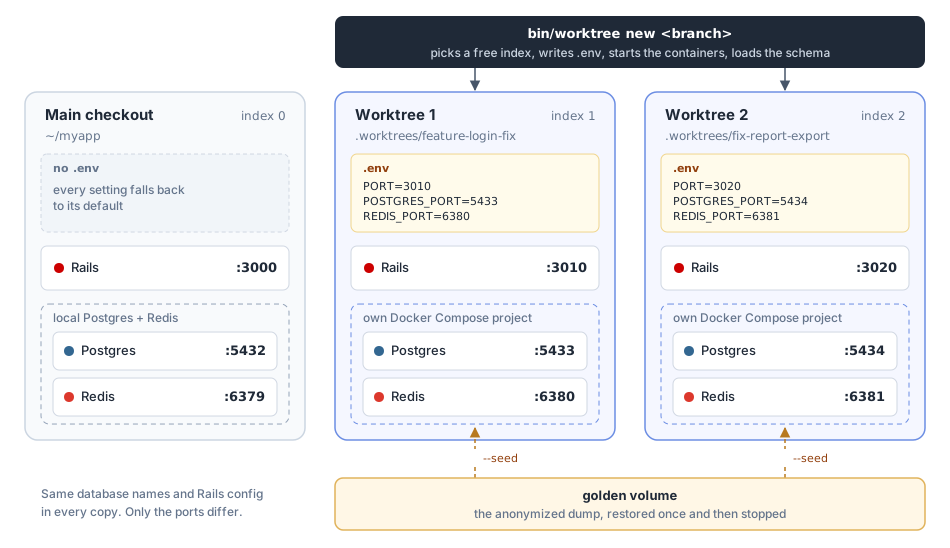
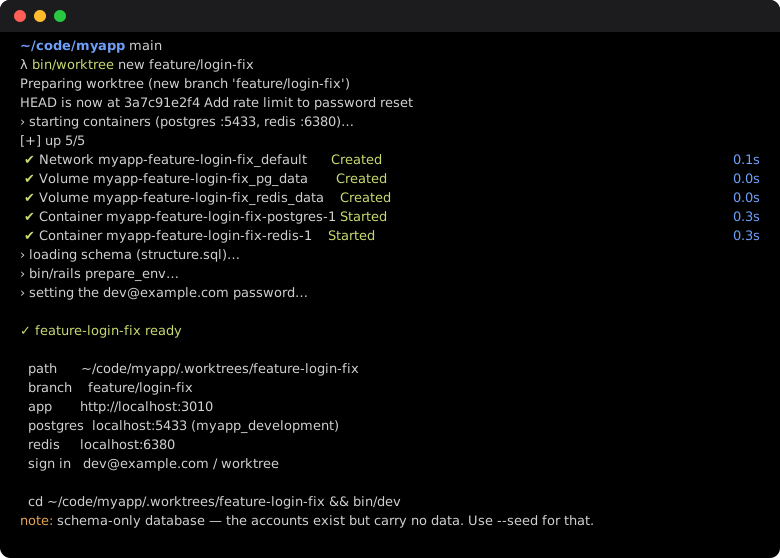
bin/worktree new sets up: the same app, running side by side, with only the ports changing.new is where the pieces from the other sections come together. It creates the git worktree from section 1, picks the index and writes the .env from section 3, starts the compose project from section 4, loads the schema, and creates a known login. About 20 seconds later I have a URL and a password.
rm matters just as much. Agents create worktrees and forget about them, and so do I. So rm drops the containers and volumes too, and it refuses to run if the worktree has uncommitted changes, commits that aren't on any remote, or a server still running on its port.
It's also where every small annoyance ends up. Every time a worktree broke in some new way, the fix went into the script, so nobody, human or agent, has to remember it.
6. Teach the AI agents how to use it
That's it for the tooling. With the script, a developer can get a separate environment locally with one command. But what makes it really powerful is when the agents use it on their own, without reading the script every time before they start. So we added a worktrees skill for our agents. It covers the commands, the port table, how to sign in, and the traps.
The most important part of it is the first check, because of one failure mode that produces no error. An agent that creates a worktree with a plain git worktree add gets a checkout with no .env. Everything falls back to the defaults, so that worktree quietly uses the main checkout's development and test databases. Its first test run wipes the test database that the main checkout, and every other unprovisioned worktree, is using.
cat .env 2>/dev/null || echo "NOT PROVISIONED"
If there's no .env, the agent runs bin/worktree init, which provisions the worktree it's already in, whatever its path. We added init after watching agents create worktrees in their own scratch directories, outside .worktrees/, where new never ran.
CLAUDE.md and AGENTS.md only have a short section that points to the skill. The full instructions load only when an agent is working in a worktree, so other sessions don't carry them in their context.
What this changed in our day-to-day work
This setup lets me work at a much bigger scale and actually get the productivity gains AI coding agents can bring.
For example, if I'm in the middle of a big task and a small bug gets assigned to me, I just start another session (while the first one keeps running) and say "use a worktree to fix this bug, validate that it works in Chrome, and if it does, push and open a draft PR". Then I can forget about it until the draft PR shows up on GitHub for me to review.
Another common case is a big task that spans several days while other requests keep coming in: client requests, small fixes, code review changes, and so on. The big feature stays isolated from all of these fast-lane tasks.
One thing that used to be a pain was verifying features locally without stopping my own work. Now, when I finish a task, big or small, I start a new session and say "look at this task and run a QA to verify it works as expected and all the ACs are met". It can run on its own in Chrome for an hour while I'm free to do everything else.

I haven't used it much this way yet, but I think it's also what enables a "loop" workflow, where an agent keeps iterating on one goal, like a performance improvement or a faster test suite, until it gets there. That work needs its own environment, running isolated and truly in parallel with everything else while it works toward the goal I gave it.
What it took, and where to start
Getting an eleven-year-old Rails app ready for several AI coding agents at once took a handful of small changes, and none of them touched application code. When this project started in 2015, it was set up for one person at one keyboard. What changed was the setup around the code: worktrees for the code, settings that come from the environment, ports derived from an index, a compose project per worktree, one script that ties it together, and a skill that teaches the agents to use it.
Your project will run into different problems than ours did. Maybe your frontend dev server hardcodes a port, or your background jobs call an external API that you don't want four copies of the app hitting at once. That second one is why we don't start Sidekiq in worktrees. Jobs wait in the worktree's Redis until someone starts a worker on purpose.
But the goal is the same for every project. Every running copy of the app needs its own files, its own port, and its own data, and the agents need to know how to set that up. If you want to try this, start with the configuration. Once every setting comes from the environment, the rest is a script that writes a different .env for each worktree. For us, that first step was putting config/database.yml back in the repository, eleven years after we removed it.
If you have an older Rails app and want it set up this way, this is the kind of work we do at JetRockets, alongside Rails upgrades. Get in touch and tell us about your app.